



Download iCare Data Recovery Software – Free, Secure, Fast File Recovery Tool for Windows, Mac, Android & iOS
In today’s digital world, losing important files—photos, documents, videos—can be devastating. Whether due to accidental deletion, formatting errors, or sudden system crashes, data loss affects everyone. iCare Data Recovery Software steps in as a reliable, free, and secure solution for recovering lost data across multiple platforms.
Designed with simplicity in mind, this software offers a streamlined recovery experience that requires no technical expertise. With just a single click, it scans your storage devices—internal drives, external hard drives, USB sticks, SD cards, and even mobile devices—to locate and restore deleted or hidden files. The intuitive interface ensures that even beginners can navigate the recovery process effortlessly.
Whether you're using Windows 11, Mac, Android, or iOS, iCare Data Recovery adapts to your environment and delivers fast, accurate results. Its lightweight design ensures minimal system impact, allowing scans to run efficiently without slowing down your device. With support for over 200 file types—including JPEGs, MP4s, DOCX, PDFs, and more—it’s one of the most versatile free recovery tools available.
The software also includes safe file preview and selective recovery, so you can restore only what you need without cluttering your system. iCare Data Recovery is a must-have for anyone looking for a trustworthy, no-cost solution to prevent digital disasters.
Simple, Powerful Recovery with One-Click Operation
One of the standout features of iCare Data Recovery Software is its commitment to user-friendliness. Unlike many data recovery tools that overwhelm users with complex settings and technical jargon, iCare keeps things refreshingly simple. The core philosophy is “recover with one click”—a promise it delivers on consistently.
From the moment you launch the application, the interface greets you with a clean, minimal layout that guides you through each step. You simply select the drive or storage device you want to scan—be it your C: drive, a USB flash drive, or an SD card—and click “Scan.” Within seconds, the software begins a deep scan, searching for deleted, corrupted, or lost files. The scanning process is intelligent, using advanced algorithms to detect remnants of data even after overwrites or formatting.
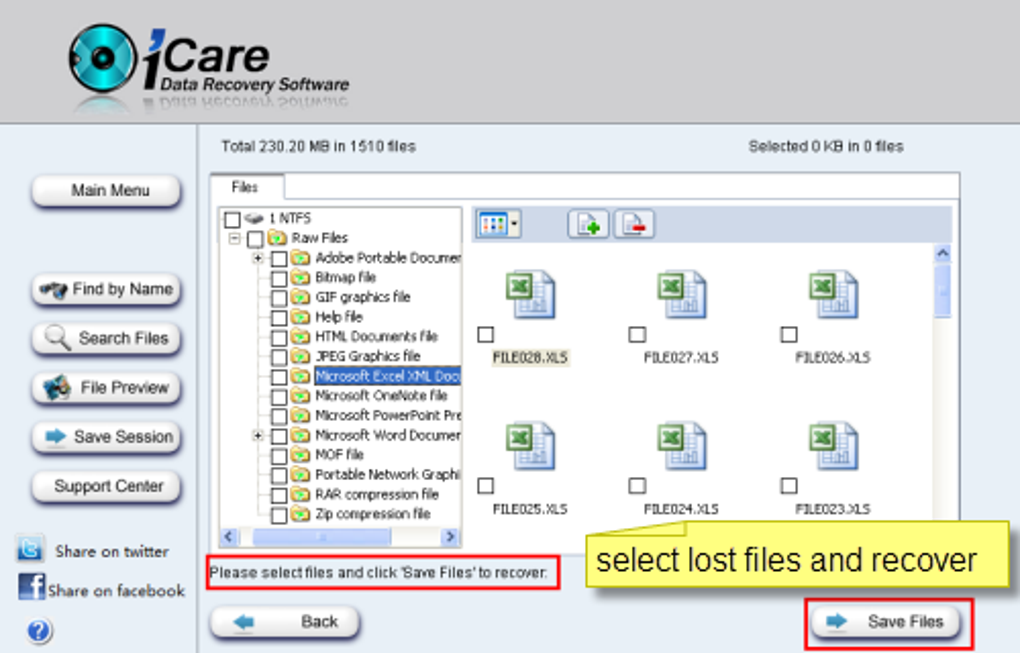
Once the scan completes, results are displayed in a clear, categorized list, making it easy to identify your desired files. You can preview images and videos directly within the app, ensuring you recover the right content without guesswork. Selecting files for recovery is as simple as checking a box and choosing a safe destination—like a different drive or folder—to prevent overwriting the original location.
This level of simplicity doesn’t come at the cost of performance. Despite its minimalistic design, iCare delivers surprisingly fast scan times, especially on smaller drives. It’s ideal for users who need a quick fix after accidental deletions or drive malfunctions.
The lack of advanced settings might deter power users, but for the average person, this streamlined approach is a major advantage. Whether you’re recovering family photos from a dropped phone or restoring work documents from a corrupted USB, iCare Data Recovery makes the process stress-free and efficient.
Wide Compatibility & Secure File Recovery Across Devices
iCare Data Recovery Software stands out not just for its simplicity but also for its broad compatibility across operating systems and devices. It supports Windows 11, Windows 10, Windows 8, Mac OS X, Android, and iOS, making it a true cross-platform solution. This versatility is a game-changer for users who work across multiple devices or need to recover data from mobile phones and tablets.
For Android users, the software can connect via USB and recover deleted photos, videos, and documents from internal storage or SD cards. Similarly, iOS users can recover data from iPhones and iPads through iTunes backup files or direct connection. On desktops, it works seamlessly with external hard drives, SSDs, memory cards, and even RAID arrays.
The software is lightweight and doesn’t require installation on all platforms—some versions run directly from a USB drive, ideal for emergency recovery on infected or unbootable systems. Security is a top priority: iCare ensures that recovered files are stored in a safe, isolated location, reducing the risk of overwriting original data. The recovery process is non-destructive, meaning it doesn’t alter the original drive structure.
This is crucial for preserving data integrity during recovery. Additionally, the software supports encrypted drives and password-protected files, although some advanced features may require a paid upgrade. For users concerned about privacy, iCare does not collect or transmit personal data during scans.
All operations happen locally on your device. Whether you’re a student recovering a term paper, a photographer restoring a lost gallery, or a business professional retrieving client files, iCare Data Recovery provides a secure, reliable, and accessible solution. Its ability to work across platforms ensures that no data is ever truly lost—just misplaced.
Pros & Cons: Is iCare Data Recovery Worth It?
- Pros:
- Free to download and use with no hidden costs
- One-click recovery with intuitive, beginner-friendly interface
- Supports over 200 file types including images, videos, documents, and archives
- Works across Windows, Mac, Android, and iOS platforms
- Fast and efficient scanning with minimal system resource usage
- Safe file preview and non-destructive recovery process
- Secure, no data transmission, privacy-focused design
- Cons:
- Limited advanced recovery options for power users
- Free version has a file size limit (typically 1GB per file)
- Some features like deep scan and recovery from RAW drives require the paid version
- Mobile recovery requires USB debugging or iTunes backup setup
- Occasional delays on very large drives due to deep scan requirements
Frequently Asked Questions (FAQ)
Conclusion: A Reliable, Free Solution for Everyday Data Recovery
If you’ve ever lost important files and felt helpless, iCare Data Recovery Software is the tool you need. With its simple interface, one-click recovery, and support across Windows, Mac, Android, and iOS, it brings professional-grade data recovery within reach of every user. While it may lack some advanced features found in paid competitors, its free version delivers exceptional value for casual and occasional users.
Whether you’ve deleted a file by accident, formatted a drive, or suffered a sudden device failure, iCare offers a secure, fast, and reliable way to get your data back. The software’s focus on privacy, non-destructive recovery, and ease of use makes it a standout choice in the crowded data recovery market. For those who want a no-risk, no-cost solution to prevent digital disasters, iCare is a must-download.
Don’t wait until it’s too late—download iCare Data Recovery today and protect your valuable memories and documents with confidence.
CTA: Download iCare Data Recovery Software Now – Free & Secure







